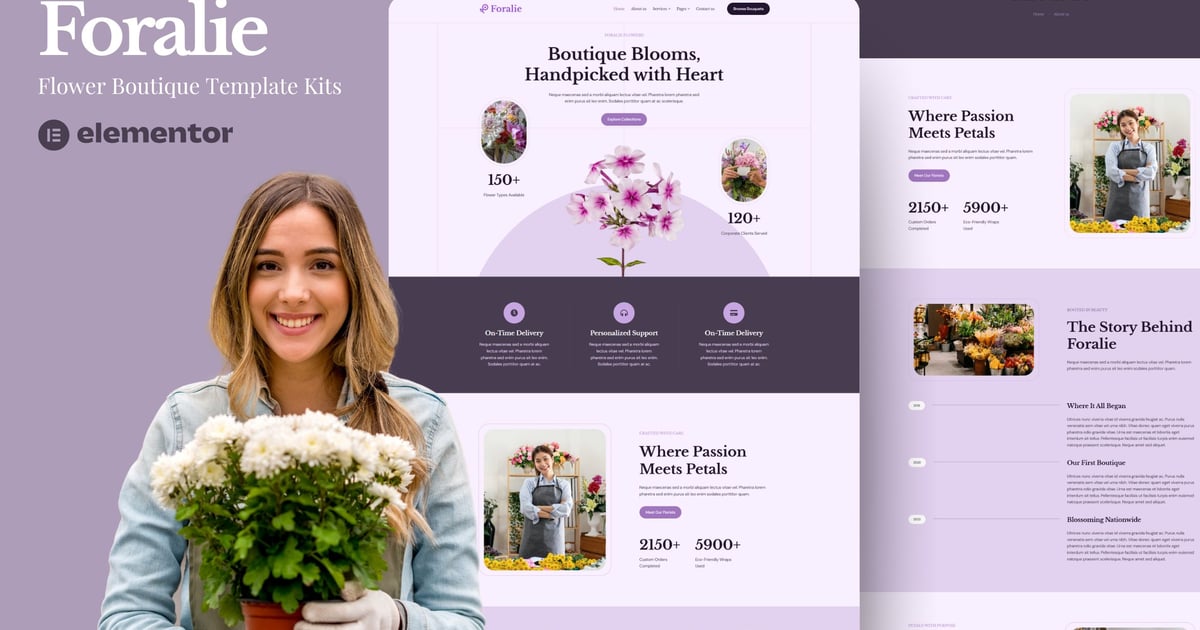
Foralie is a charming and elegant Elementor Template Kit tailored for modern flower shops, florists, and boutique floral businesses. Designed with soft aesthetics, clean typography, and calming pastel tones, this template brings a romantic and professional flair to your website. Whether you sell bouquets, provide floral arrangements for events, or run a custom floral service, Foralie helps you showcase your creativity with grace. Fully responsive and SEO-optimized, it supports easy navigation and fast customization via Elementor – no coding needed. Each page is thoughtfully crafted to highlight your floral offerings, tell your story, and encourage customers to connect and order with confidence. With beautifully structured layouts for services, galleries, team intros, and more, Foralie lets your brand bloom online just like your flowers do in real life.
Features
True no-code customization with drag and drop visual builder
Customize fonts and colors in one place or fine-tune on individual elements
Modern, professional design
Fast-loading
Works with most Elementor themes.
Note: This is a headless eCommerce solution to be integrated with the cart plugin or platform of your choice.
Included Pages:
About Us
Services
Services Details
Gallery
Pricing
Help Center
Contact Us
Plugins installed with kit
Jeg Elementor Kit
Metform
The Plus Add-On
This is not a WordPress Theme. Template kits contain the design data for Elementor only and are installed using the envato Elements plugin for WordPress or directly through Elementor.
Download your kit file from Envato and do not unzip it. If you use Safari browser you may need to ensure "Open safe files after downloading" is disabled in the browser preferences.
Go to Settings > Permalinks and ensure Post Name is selected
Go to Appearance > Themes > Add New and ensure Hello Elementor is installed and activated. This will prompt you to install Elementor if you haven’t already.
Go to Plugins and ensure Elementor and Envato Elements are installed and at the latest version. If your kit requires Elementor Pro, it must be installed now and connected to your account.
Go to Elements > Installed Kits and click Upload Template Kit Zip (or click your kit to view it)
Check for the orange banner at the top and click Install Requirements to load any plugins the kit uses. https://envato.d.pr/ughD8Q
Click import on the Global Kit Styles first. This will setup the site settings.
Click Import on one template at a time in the order shown. These are stored in Elementor under Templates > Saved Templates and are re-used from here.
Creating pages
Go to Pages and create a new page and click Edit with Elementor
Click the gear icon at lower-left of the builder to view page settings and choose Elementor Full Width and hide page title
Click the gray folder icon to access My Templates tab and then Import the page you’d like to customize.
The home page is set under Settings > Reading by selecting Static Front Page.
If you have Elementor Pro, headers and footers are customized under Templates > Theme Builder.
Detailed Guide: https://help.market.envato.com/hc/en-us/articles/900000842846-How-to-use-the-Envato-Elements-WordPress-Plugin-v2-0
For further support, go to Elementor > Get Help in WordPress menu.
How to Import Metforms
If you have Elementor Pro, skip install of Metform and form blocks.
Import the metform block templates
Import the page template where the form appears and right-click to enable the Navigator
Locate and select the Metform widget and click Edit Form. Choose New, then Edit Form. The builder will appear
Click ‘Add Template’ grey folder icon.
Click ‘My Templates’ tab.
Choose your imported metform template, then click ‘Insert’ (click No for page settings).
Once the template is loaded, make any desired customizations and click ‘Update & Close’ The form will appear in the template
Click Update
How to setup header in Jeg Elementor Kit plugin
If you have Elementor Pro, headers and footers may be customized under Theme Builder.
Go to Jeg Elementor Kit menu item > Header Template
Click Add New Header
Add condition > All Site and click Create
Click gray folder icon to access My Templates tab
Insert the header template.
Customize and Save.
This Template Kit uses demo images from Envato Elements. You will need to license these images from Envato Elements to use them on your website, or you can substitute them with your own.
https://elements.envato.com/collections/J8TBH9EFZD
Explore more high-quality resources in our Graphics & Illustrations library, and pair them with curated Graphic Templates and Web & Site Templates for your digital creations.