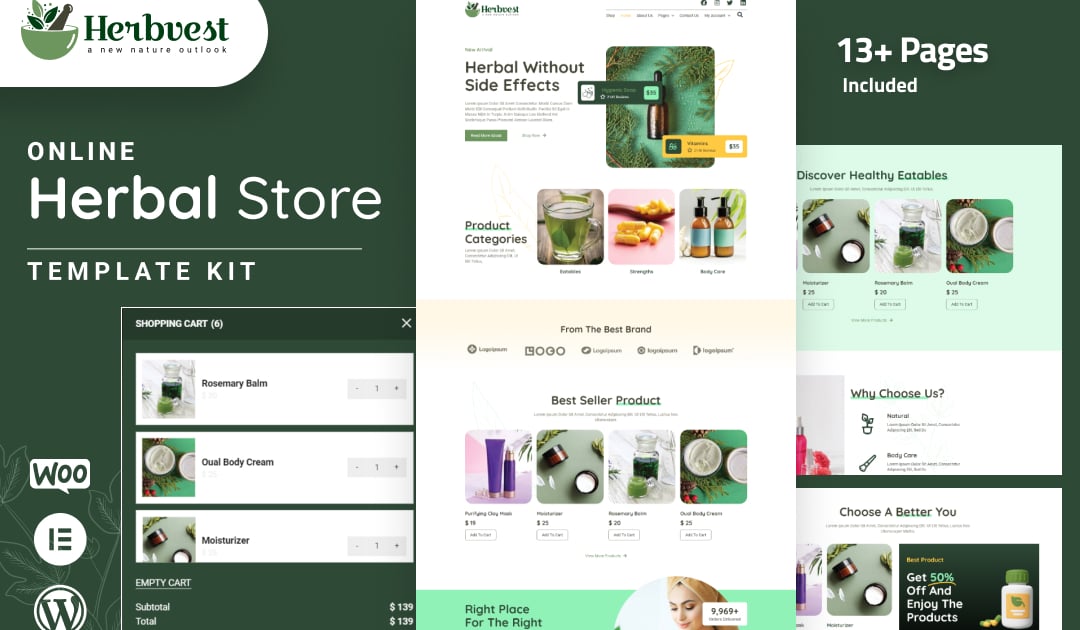
Herbvest is an Herbal Elementor Template kit for building stores in WordPress Seamlessly integrated with WooCommerce, it offers a nature-inspired design, showcasing herbal products and wellness insights. Responsive, SEO-optimized, and featuring a newsletter subscription, Herbvest simplifies setup for a thriving online herbal community.
#### Features
Individual elements can be fine-tuned or fonts and colors can be changed all in one spot.
Drag-and-drop visual builder for true no-code customization.
Design that is both contemporary and professional.
Fast-loading.
Most Elementor themes are compatible with this plugin.
#### Templates Include:
About Us
Shop/Product
Testimonials
Single Post
Contact Us
My Account
Checkout
Single Product Page/li>
Coming Soon
#### Sections and Blocks:
Contact Form
Message Form
Newsletter Form
#### Required Plugins Pre-Installed With the Kit
Elementor
Elementor Pro
Ultimate Post Kit
WooCommerce
#### Template Kits: How to Use Theme
Install and activate the "Envato Elements" plugin in WordPress by going to Plugins > Add New.
Don’t unzip your kit file after downloading it.
Click the Upload Template Kit button in Elements > Installed Kits. You can also import automatically by linking your Elements membership with Connect Account, then importing under Elements > Template Kits.
Check the top of the page for an orange banner, then click Install Requirements to load any plugins the kit requires.
First, import the Global Kit Styles.
One template at a time, click Import. These can be found under Elementor’s Templates > Saved Templates section.
Create a new page in Pages and then click Edit with Elementor.
To view page options, click the gear icon in the lower-left corner of the builder and select Elementor Full Width and Hide Page Title.
To get to the My Templates tab, click the grey folder icon, then Import the page you want to alter.
Theme Builder allows you to alter the headers and footers if you have Elementor Pro.
<span>Visit for more detail guidance: [https://help.market.envato.com/hc/en-us/articles/900000842846-How-to-use-the-Envato-Elements-WordPress-Plugin-v2-0](https://help.market.envato.com/hc/en-us/articles/900000842846-How-to-use-the-Envato-Elements-WordPress-Plugin-v2-0)</span>
To get further help, go to the WordPress menu and select Elementor > Get Help.
#### Importing Metforms: What You Need to Know
The metform block templates should be imported.
Import the page template with the form on it and enable the Navigator by right-clicking.
Click Edit Form after locating and selecting the Metform widget. Then select New and Edit Form from the drop-down menu. The function Object() { [native code] } will show up.
Select the grey folder icon that says ‘Add Template’.
Select the ‘My Templates’ option from the drop-down menu.
Then click ‘Insert’ after selecting your imported metform template (click No for page settings).
After you’ve finished customizing the template, click ‘Update & Close.’ In the template, the form will appear.
Update the information by clicking the button.
#### In Elementor Pro, Configure The Global Header and Footer
Import the template for the header and footer.
Navigate to templates > Theme Builder, Header Footer and select Add New (if prompted with a wizard, you may click Next through it without taking any action).
Toggle Activation to On, title the header, and leave Entire Site selected.
To open the builder, click the grey Edit Content button.
Select the header template to import by clicking the grey folder icon, then select your menu in the nav element and click Update.
Repeat for the footer.
Envato Elements demo pictures are used in this Template Kit. To use these photos on your website, you’ll need to purchase a license from Envato Elements, or you can use your own.
https://elements.envato.com/fr/collections/8KM9EWY4G6
Explore more high-quality resources in our Graphics & Illustrations library, and pair them with curated Graphic Templates and Web & Site Templates for your digital creations.
📋 Asset Specifications & Compatibility
Item Title
HerbVest – Herbal Store Elementor Pro Template Kit
Formats / Software
Adobe Photoshop / Illustrator / PNG
License Type
Commercial & Personal Use
Original creative preview & visual showcase
⚡ High-Speed Direct Cloud Download
Original untouched resource package hosted on 5TB unlimited Google Drive:
🔒 Direct SSL Encrypted Link • Fast Unthrottled Speed • Original Clean Archive
🔗 Explore Related Digital Asset Categories