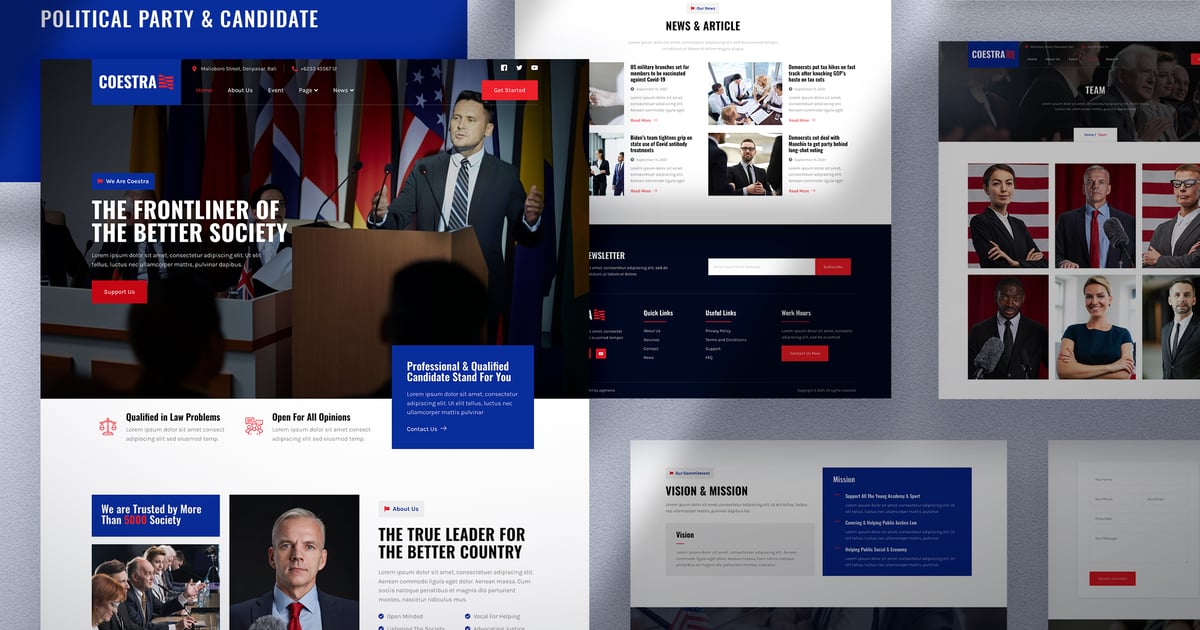
Coestra is a Modern and Elegant Political Party & Candidate Elementor Template
Kit that perfect for creating a website for Political Party, Politician,
Candidate, Government, Activist or Election Website. This template has a
Modern and Professional design with a 100% responsive layout, retina-ready,
and easy to customize.
This template kit includes 15+ carefully crafted templates,
you can build your professional-looking business website just a click away.
Using Free Plugins (Elementor Pro is not required)
Modern, Classic & Clean Design
15+ Ready to use templates
Fully Responsive Layout
Retina Ready
Fully Customizable
Cross Browser Compatibility: Chrome, Firefox, Safari, Opera
Templates Include:
About Us
Gallery
Single Post
404 Page
Contact Us
Metform – Contact Us Form
Metform – Join Form
Global Theme Style
Required Plugin:
Elementor
Jeg Elementor Kit
Elementor – Header, Footer & Blocks
Metform
How to Use Template Kits:
Install and Activate the "Envato Elements" plugin from Plugins > Add New in WordPress
Do not unzip
Go to Elements > Installed Kits and click the Upload Template Kit button.
Before importing a template, ensure the Install Requirements button is clicked to activate required plugins
For best results, do not import more than one template at a time.
Go to Pages and create a new page and click Edit with Elementor
Click the gear icon at lower-left of the builder to view page settings and choose Elementor Full Width and hide page title
Click the gray folder icon to access My Templates tab and then Import the page you’d like to customize
[Detailed Guide](https://help.market.envato.com/hc/en-us/articles/900000842846-How-to-use-the-Envato-Elements-WordPress-Plugin-v2-0")
For further support, go to Elementor > Get Help in WordPress menu.
How to Import Metforms
Import the metform block templates
Import the page template where the form appears and right-click to enable the Navigator
Locate and select the Metform widget and click Edit Form. Choose New, then Edit Form. The builder will appear
Click ‘Add Template’ grey folder icon.
Click ‘My Templates’ tab.
Choose your imported metform template, then click ‘Insert’ (click No for page settings).
Once the template is loaded, make any desired customizations and click ‘Update & Close’ The form will appear in the template
Click Update
Setup Global Header and Footer in Header Footer & Blocks plugin
Import the header and footer template
Go to Appearance > Header Footer and click Add New button
Give it a title and select Header, Display on Entire Site and click Publish
Click Edit with Elementor
Click the gray folder icon to access My Templates tab and select the header template to import and Update.
Repeat for Footer
Images:
This Template Kit uses demo images from Envato Elements. You will need to license these images from Envato Elements to use them on your website, or you can substitute them with your own.
https://elements.envato.com/image-P9DSFRT
https://elements.envato.com/image-C244EF7
https://elements.envato.com/image-VRWSHL9
https://elements.envato.com/image-P2UVTQN
https://elements.envato.com/image-DNMAPFB
https://elements.envato.com/image-RW2D9LL
https://elements.envato.com/image-P3J6DUH
https://elements.envato.com/image-P8MBXNR
https://elements.envato.com/image-LMP8XPE
https://elements.envato.com/image-HEALS8Y
https://elements.envato.com/image-5YCJB4D
https://elements.envato.com/image-BM7AXWA
https://elements.envato.com/image-QTW6V3Z
https://elements.envato.com/image-U264ZGE
https://elements.envato.com/image-ZQ3RHLP
https://elements.envato.com/image-P5YZNJB
https://elements.envato.com/image-L2YN87E
https://elements.envato.com/image-QPRLRJ4
https://elements.envato.com/image-QMSJFLQ
https://elements.envato.com/image-H7HPLZ8
https://elements.envato.com/image-KT2CAEQ
https://elements.envato.com/image-YTRZCU5
https://elements.envato.com/image-DTRNQNH
https://elements.envato.com/image-A8D2G7D
https://elements.envato.com/image-P3XX8D2
https://elements.envato.com/image-RWEZNTM
https://elements.envato.com/image-PUKYPXS
https://elements.envato.com/image-9NZCZ8V
https://elements.envato.com/image-4R5EHC3
https://elements.envato.com/image-RCLBYSF
https://elements.envato.com/image-RPSPG48
https://elements.envato.com/image-CYPXDAV
https://elements.envato.com/image-25XVNVC
https://elements.envato.com/image-5XQU7FF
https://elements.envato.com/image-2B9VSXA
https://elements.envato.com/image-W9PCPY4
Explore more high-quality resources in our Graphics & Illustrations library, and pair them with curated Graphic Templates and Web & Site Templates for your digital creations.
📋 Asset Specifications & Compatibility
Item Title
Coestra – Political Party & Candidate Elementor Template Kit
Formats / Software
Adobe Photoshop / Illustrator / PNG
License Type
Commercial & Personal Use
Original creative preview & visual showcase
⚡ High-Speed Direct Cloud Download
Original untouched resource package hosted on 5TB unlimited Google Drive:
🔒 Direct SSL Encrypted Link • Fast Unthrottled Speed • Original Clean Archive
🔗 Explore Related Digital Asset Categories