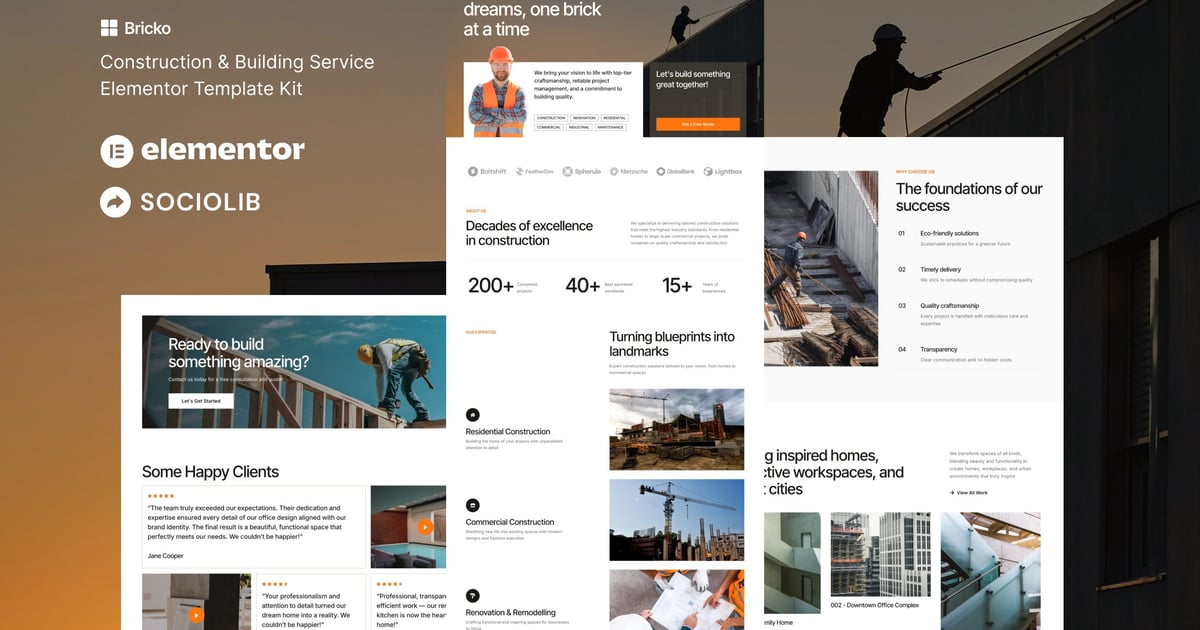
Bricko is an Elementor Template Kit for quickly and easily creating Construction & Building Service website using the Elementor Page Builder plugin for WordPress. Suitable for Construction, Building, Renovation, Industry, Manufacturing, Roofing, Architecture, Builder, Corporate, etc. Style your WordPress website with this creative and modern web design style template kit to bring a modern feel to your blog.
12+ Templates
True no-code customization with drag and drop visual builder
Customize fonts and colors in one place or fine-tune on individual elements
Clean and Minimal Design
Fast-loading
Works with most Elementor themes
Responsive Design
Services
Projects
Single Project
Pricing
Contact
Contact Form
Global Style
### Plugins (installed with kit)
ElementsKit Lite
Metform
### How to Use Template Kits:
This is not a WordPress Theme. Template kits contain the design data for Elementor only and are installed using the envato Elements plugin for WordPress or directly through Elementor.
Elementor Template Kits use the Envato Elements plugin to install.
Detailed Guide:
https://help.elements.envato.com/hc/en-us/articles/36032349441945-How-to-Install-Elementor-Template-Kits-With-the-Envato-Elements-Plugin-in-WordPress-for-Envato-Elements-Subscribers
For further support, go to Elementor > Get Help in WordPress menu.
How to Import MetForm Custom Form:
While edititing a page where a form should appear, open the Elementor navigator to locate the Metform widget.
Click Edit Form in the builder panel.
Select New, leave blank selected then click Edit Form button.
Click ‘Add Template’ grey folder button.
Click ‘My Templates’ tab.
Choose your imported MetForm template, then click ‘Insert’.
Once the template is loaded, click ‘Update’.
Setup Header in ElementsKit Lite
If you have Elementor Pro, setup headers and footers in Theme Builder. Pages you create with Elementor must have the Page Layout set to Elementor Full width for the global header and footer to appear.
Go to ElementsKit > Header Footer
If prompted to go through the wizard, click Next all the way through and then return to step 1 (you are not required to enter your email address or share your information)
Click Add New Template button at the top
Name your template, then toggle "Activate/Deactivate:" to On
Click the gray Edit Content button. Elementor will open.
Click the gray folder icon to access My Templates tab and Insert the header or footer template.
Customize and Publish
This Template Kit uses demo images from Envato Elements. You will need to license these images from Envato Elements to use them on your website, or you can substitute them with your own.
https://elements.envato.com/collections/36UK5L9MJE
Explore more high-quality resources in our Graphics & Illustrations library, and pair them with curated Graphic Templates and Web & Site Templates for your digital creations.
📋 Asset Specifications & Compatibility
Item Title
Bricko – Construction & Building Service Elementor Template Kit
Formats / Software
Adobe Photoshop / Illustrator / PNG
License Type
Commercial & Personal Use
Original creative preview & visual showcase
⚡ High-Speed Direct Cloud Download
Original untouched resource package hosted on 5TB unlimited Google Drive:
🔒 Direct SSL Encrypted Link • Fast Unthrottled Speed • Original Clean Archive
🔗 Explore Related Digital Asset Categories