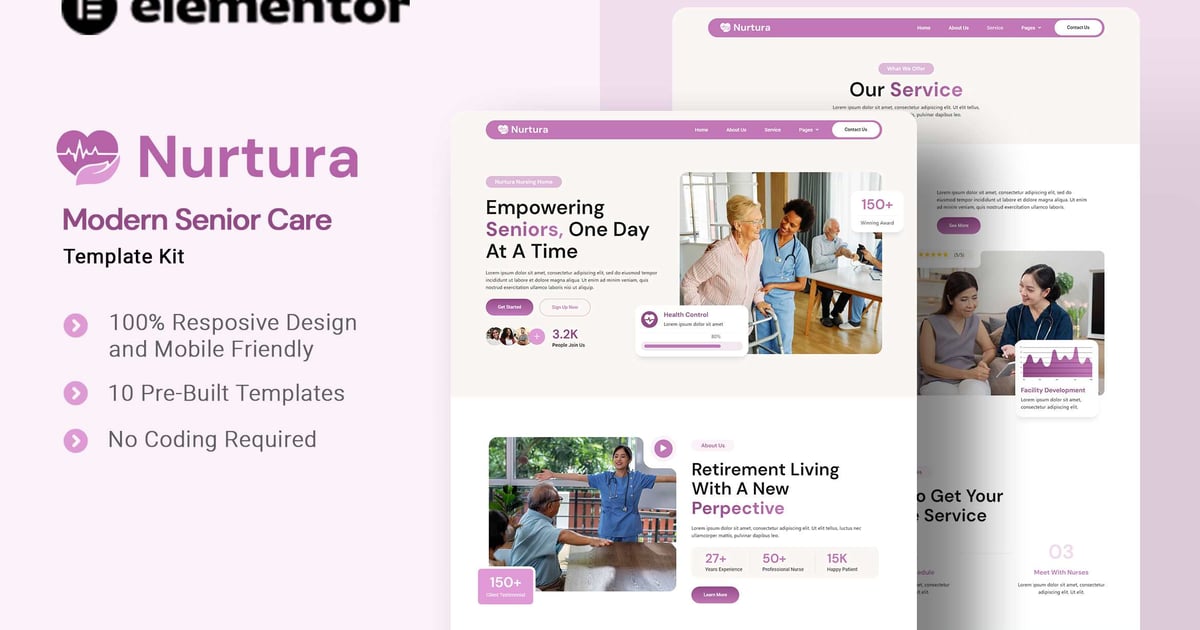
Nurtura is an Elementor Template Kit for quickly and easily creating websites for your business using the Elementor Page Builder plugin for WordPress. This is not a WordPress theme. Template Kits contain page content for Elementor page builder. This kit has been optimized for use with the free Hello Elementor theme but may be used with most themes that support Elementor.

Templates

  • About Us
  • Service
  • Appointment
  • Our Team
  • Single Blog
  • Error 404
  • Contact Us
  • Font Used

  • DM Sans
  • Plugins installed with kit

  • Elementor
  • ElementsKit
  • Jeg Elementor Kit
  • Metform
  • How to Use Template Kits:

    This is not a WordPress Theme. Template kits contain the design data for Elementor only and are installed using the envato Elements plugin for WordPress or directly through Elementor.

    Elementor Template Kits use the Envato Elements plugin to install.

  • https://help.elements.envato.com/hc/en-us/articles/36032349441945-How-to-Install-Elementor-Template-Kits-With-the-Envato-Elements-Plugin-in-WordPress-for-Envato-Elements-Subscribers
  • https://help.market.envato.com/hc/en-us/articles/36033428836889-How-to-Upload-Install-Elementor-Template-Kits-from-Themeforest-to-WordPress

    For further support, go to Elementor > Get Help in WordPress menu.

    How to Import Metforms

    If you have Elementor Pro, skip install of Metform and form blocks.

  • Import the metform block templates
  • Import the page template where the form appears and right-click to enable the Navigator
  • Locate and select the Metform widget and click Edit Form. Choose New, then Edit Form. The builder will appear
  • Click ‘Add Template’ grey folder icon.
  • Click ‘My Templates’ tab.
  • Choose your imported metform template, then click ‘Insert’ (click No for page settings).
  • Once the template is loaded, make any desired customizations and click ‘Update & Close’ The form will appear in the template
  • Click Update
  • How to setup header in Jeg Elementor Kit plugin

    If you have Elementor Pro, headers and footers may be customized under Theme Builder.

  • Go to Jeg Elementor Kit menu item > Header Template
  • Click Add New Header
  • Add condition > All Site and click Create
  • Click the pencil icon to Edit and elementor will appear
  • Click gray folder icon to access My Templates tab
  • Insert the header template.
  • Customize and Save.
  • Images

    This Template Kit uses demo images from Envato Elements. You will need to license these images from Envato Elements to use them on your website, or you can substitute them with your own.

  • https://elements.envato.com/collections/QDEKC3WYM6
  • Explore more high-quality resources in our Graphics & Illustrations library, and pair them with curated Graphic Templates and Web & Site Templates for your digital creations.

    📋 Asset Specifications & Compatibility
    Item Title
    Nurtura – Modern Senior Care Elementor Template Kit

    Element ID
    3FZJLKW

    Formats / Software
    Adobe Photoshop / Illustrator / PNG

    License Type
    Commercial & Personal Use

    Nurtura - Modern Senior Care Elementor Template Kit Preview

    Original creative preview & visual showcase

    ⚡ High-Speed Direct Cloud Download

    Original untouched resource package hosted on 5TB unlimited Google Drive:
    ☁️ Download Package (Google Drive)
    🔒 Direct SSL Encrypted Link • Fast Unthrottled Speed • Original Clean Archive