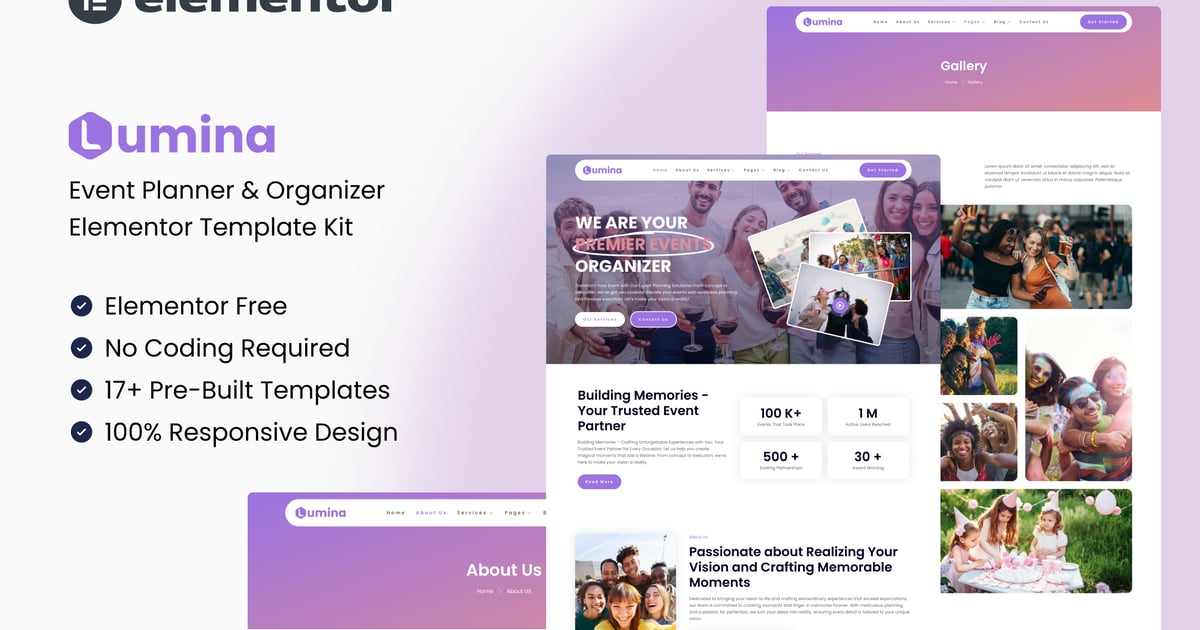
Unlock the potential of your event planning endeavors with Lumina, a comprehensive toolkit designed to streamline the process of organizing and managing unforgettable gatherings. From corporate conferences to weddings and community events, Lumina offers an array of customizable templates and features to suit your unique needs. With its intuitive interface and modern design, Lumina empowers you to create stunning event websites that captivate and inspire. Elevate your event planning game and impress your clients with Lumina – the ultimate solution for crafting extraordinary experiences.

With Lumina, the stress of event planning becomes a thing of the past as you harness the power of intuitive tools and cutting-edge design elements. Seamlessly navigate through the process of conceptualizing, organizing, and executing events with ease, thanks to Lumina’s user-friendly interface. Whether you’re a seasoned event planner or just starting out, Lumina provides the perfect platform to showcase your creativity and expertise. Take your event planning business to new heights and leave a lasting impression on your clients with Lumina by your side.

Important: This is an Elementor Template Kit. Do not use WordPress “Tools > Import”. Install the Template Kit Import plugin (Plugins > Add New), then go to Tools > Template Kit to import.

  • Perfect for Event & Organizer
  • Fully With Elementor Free Version (Elementor Pro is not required)
  • Simple, Modern and Clean Design
  • No Coding Knowledge Required
  • 21+ Ready To Use Templates
  • Responsive & Retina Ready
  • Easy & Fully Customizable
  • Templates Include:

  • Global Kit Styles
  • Services
  • Service Detail
  • Our Team
  • Gallery
  • Pricing
  • Single Blog
  • Contact Us
  • Metform Contact
  • 404 Page
  • Coming Soon
  • Required Plugin:

  • Elementor (Free)
  • Jeg Elementor Kit
  • MetForm
  • How to Use Template Kits:

    This is not a WordPress Theme. Template kits contain the design data for Elementor only and are installed using the Template Kit Import plugin for WordPress.

    Install and import kits via Tools > Template Kit after installing the "Template Kit Import" plugin (Plugins > Add New > search "Template Kit Import" by Envato).

  • Plugins > Add New → search “Template Kit Import” (by Envato) → Install & Activate
  • Go to Tools > Template Kit
  • Upload your Template Kit ZIP
  • Click “Install Requirements”
  • Import “Global Kit Styles” first, then the pages/parts you need
  • Help & Support

    Need more help? Choose an option below:

  • Full Guide: https://help.market.envato.com/hc/en-us/articles/36033428836889-How-to-Upload-Install-Elementor-Template-Kits-from-Envato
  • Contact Us: https://themeforest.net/user/codeinsolutions#message
  • For further support, go to Elementor > Get Help in WordPress menu.

    How to Import Metforms

    If you have Elementor Pro, skip install of Metform and form blocks.

  • Import the metform block templates
  • Import the page template where the form appears and right-click to enable the Navigator
  • Locate and select the Metform widget and click Edit Form. Choose New, then Edit Form. The builder will appear
  • Click ‘Add Template’ grey folder icon.
  • Click ‘My Templates’ tab.
  • Choose your imported metform template, then click ‘Insert’ (click No for page settings).
  • Once the template is loaded, make any desired customizations and click ‘Update & Close’ The form will appear in the template
  • Click Update
  • How to setup header in Jeg Elementor Kit plugin

    If you have Elementor Pro, headers and footers may be customized under Theme Builder.

  • Go to Jeg Elementor Kit menu item > Header Template
  • Click Add New Header
  • Add condition > All Site and click Create
  • Click gray folder icon to access My Templates tab
  • Insert the header template.
  • Customize and Save.
  • Images

    This Template Kit uses demo images from Envato Elements. You will need to license these images from Envato Elements to use them on your website, or you can substitute them with your own.

  • https://elements.envato.com/collections/3CGQYZTNJR?utm_source=my_collection&utm_medium=link&utm_campaign=share_collection
  • FAQ

  • Can I import via WordPress “Tools > Import”? No. That importer handles WXR posts/pages. This is an Elementor Template Kit and must be imported with the Template Kit Import plugin via Tools > Template Kit.
  • Do I need Elementor Pro? No, this kit is built for Elementor Free unless otherwise noted.
  • My pages don’t look like the demo. Go to Tools > Template Kit and click “Install Requirements”, then import “Global Kit Styles” first before importing pages/parts.
  • Explore more high-quality resources in our Graphics & Illustrations library, and pair them with curated Graphic Templates and Web & Site Templates for your digital creations.

    📋 Asset Specifications & Compatibility
    Item Title
    Lumina – Event Planner & Organizer Elementor Template Kit

    Element ID
    E2U9B3R

    Formats / Software
    Adobe Photoshop / Illustrator / PNG

    License Type
    Commercial & Personal Use

    Lumina - Event Planner & Organizer Elementor Template Kit Preview

    Original creative preview & visual showcase

    ⚡ High-Speed Direct Cloud Download

    Original untouched resource package hosted on 5TB unlimited Google Drive:

    ☁️ Download Package (Google Drive)
    🔒 Direct SSL Encrypted Link • Fast Unthrottled Speed • Original Clean Archive