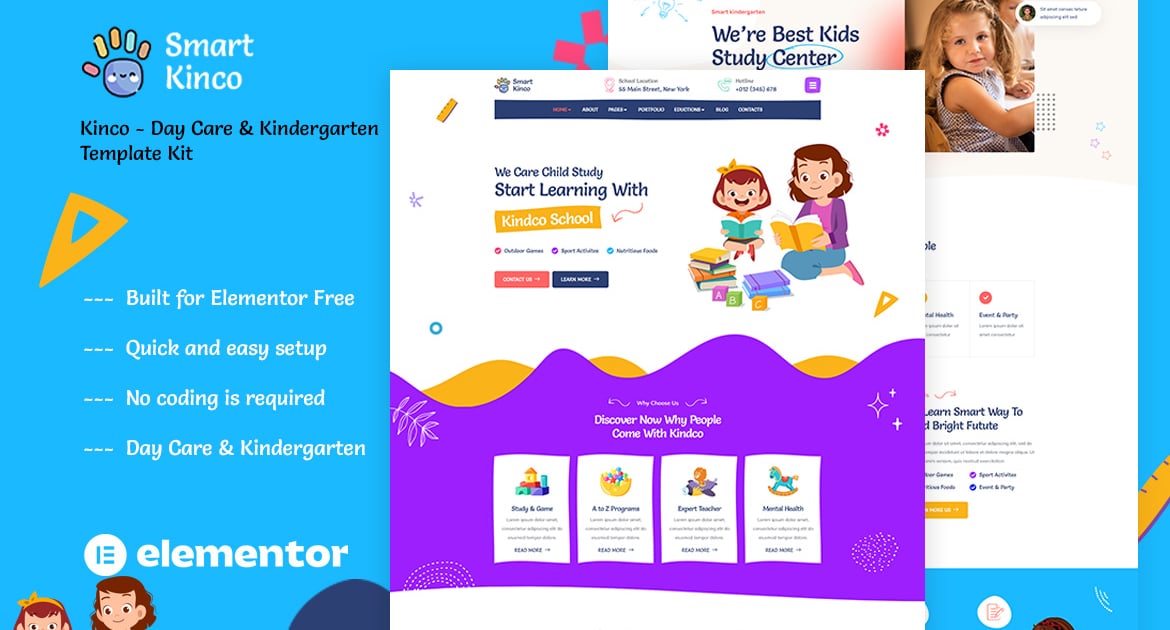
Kinco is a Template Kit created for Kindergarten and Preschool. Build for a website kindergarten, childcare, pre-school, homeschooling, school, learning, playground businesses or any other related website. This template is packed with 10 different pages for your website, has a beautiful and unique design with a 100% responsive layout, retina-ready, and very easy to customize because using Elementor so you don’t need a single line of coding!
Kinco – Day Care & Kindergarten Template Kit is packed with powerful and intuitive features, providing endless possibilities, you can build a full education website in just a few clicks
### Required Plugins :
Elementor
Themesflat Addons For Elementor
MetForm
Sticky Header Effects for Elementor
ElementsKit Lite
2 Homepage Versions
No Coding Knowledge Required
no upgrades required
Header & Footer Builder Included
One Click Demo Import
Playful style
Graphics included
Cross browser compatible
Post Widget
Carousel Slide Box ( Create sliders with anything )
Ultra Responsive and Retina Ready
Compatible with most WordPress themes
Optimized for search engines
How to Use Template Kits:
Install and Activate the "Envato Elements" plugin from Plugins > Add New in WordPress
Download your kit file and Do not unzip
Go to Elements > Installed Kits and click the Upload Template Kit button. You may also import automatically by clicking Connect Account to link your Elements subscription, then import under Elements > Template Kits.
Check for the orange banner at the top and click Install Requirements to load any plugins the kit uses
Click import on the Global Kit Styles first
Click Import on one template at a time. These are stored in Elementor under Templates > Saved Templates.
Go to Pages and create a new page and click Edit with Elementor
Click the gear icon at lower-left of the builder to view page settings and choose Elementor Full Width and hide page title
Click the gray folder icon to access My Templates tab and then Import the page you’d like to customize.
If you have Elementor Pro, headers and footers may be customized under Theme Builder.
Detailed Guide: https://help.market.envato.com/hc/en-us/articles/900000842846-How-to-use-the-Envato-Elements-WordPress-Plugin-v2-0
For further support, go to Elementor > Get Help in WordPress menu.
How to Import Metforms
Import the metform block templates
Import the page template where the form appears and right-click to enable the Navigator
Locate and select the Metform widget and click Edit Form. Choose New, then Edit Form. The builder will appear
Click ‘Add Template’ grey folder icon.
Click ‘My Templates’ tab.
Choose your imported metform template, then click ‘Insert’ (click No for page settings).
Once the template is loaded, make any desired customizations and click ‘Update & Close’ The form will appear in the template
Click Update
This Template Kit uses demo images from Envato Elements. You will need to license these images from Envato Elements to use them on your website, or you can substitute them with your own.
https://elements.envato.com/image-5EP5GAB
https://elements.envato.com/image-V3CQF4W
https://elements.envato.com/image-7SJQAGW
https://elements.envato.com/image-ATHJV6H
https://elements.envato.com/image-JHJJPBF
https://elements.envato.com/image-YCGCCNS
https://elements.envato.com/image-L94DXXZ
https://elements.envato.com/image-3VF7KRB
https://elements.envato.com/image-QSEF2JM
https://elements.envato.com/image-YBGBW4A
https://elements.envato.com/image-RMC99XN
https://elements.envato.com/image-Z5XUQKX
https://elements.envato.com/image-ZLTJGHP
https://elements.envato.com/image-LC5LVT4
https://elements.envato.com/image-TH5Y9TX
https://elements.envato.com/image-PW2BQD5
https://elements.envato.com/image-5BQJG4H
https://elements.envato.com/image-QW5L4D3
https://elements.envato.com/image-PYH2VJM
https://elements.envato.com/image-965D8G5
https://elements.envato.com/image-NHULD6F
https://elements.envato.com/image-N9ZHH7K
https://elements.envato.com/image-CSSFQDV
https://elements.envato.com/image-HEQMB55
https://elements.envato.com/image-4HUTUUQ
https://elements.envato.com/image-RVAQE9B
https://elements.envato.com/image-2K89BTD
https://elements.envato.com/image-PVSNGDH
https://elements.envato.com/image-TCGK2PE
https://elements.envato.com/image-A3GSLKU
https://elements.envato.com/image-SGQT4KC
https://elements.envato.com/image-65EVRCZ
https://elements.envato.com/image-NM7C9LS
https://elements.envato.com/image-PYAVNE3
https://elements.envato.com/image-PSL7KE2
https://elements.envato.com/image-DXY2CZA
https://elements.envato.com/image-5NBUFFS
https://elements.envato.com/image-PQNY3TT
https://elements.envato.com/image-W73EUUE
https://elements.envato.com/image-CRN9N3A
https://elements.envato.com/image-TFDCEFX
https://elements.envato.com/image-9PB5FN8
https://elements.envato.com/image-TPNANQM
https://elements.envato.com/image-5DK7H6B
https://elements.envato.com/image-LCEE2WM
Explore more high-quality resources in our Graphics & Illustrations library, and pair them with curated Graphic Templates and Web & Site Templates for your digital creations.
📋 Asset Specifications & Compatibility
Item Title
Kinco – Day Care & Kindergarten Elementor Template Kit
Formats / Software
Adobe Photoshop / Illustrator / PNG
License Type
Commercial & Personal Use
Original creative preview & visual showcase
⚡ High-Speed Direct Cloud Download
Original untouched resource package hosted on 5TB unlimited Google Drive:
🔒 Direct SSL Encrypted Link • Fast Unthrottled Speed • Original Clean Archive
🔗 Explore Related Digital Asset Categories