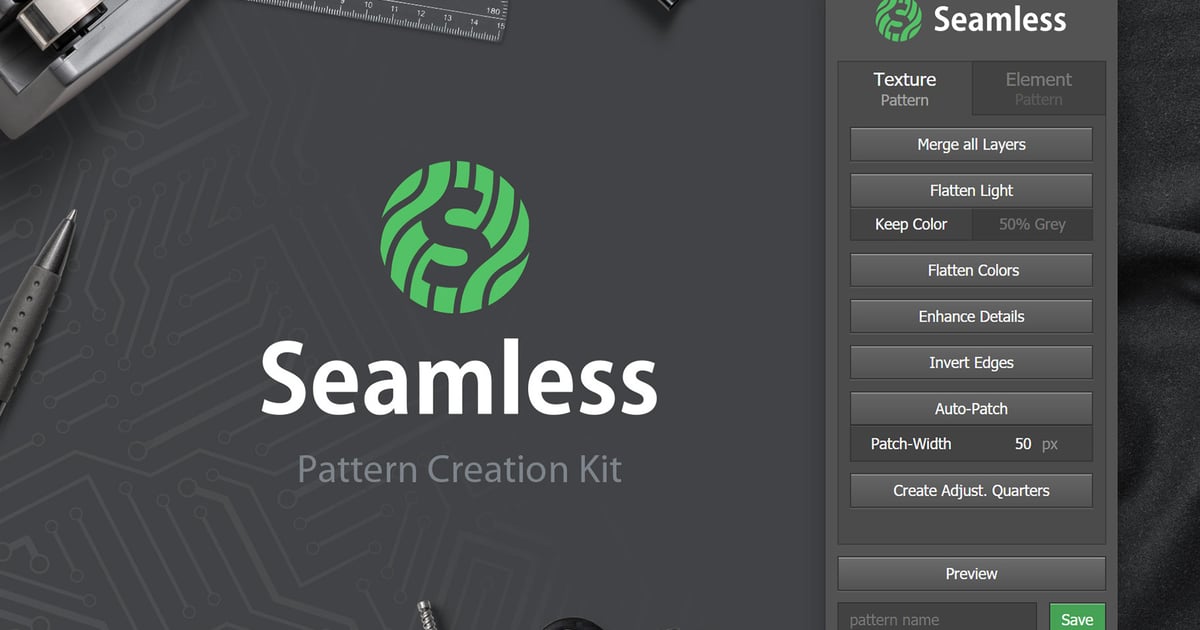
Seamless is a photoshop plugin helping you to create seamless/tileable patterns or textures with just a few clicks. What exactly does that mean? A Seamless pattern can be repeated without revealing harsh edges. To achieve this, this tool offers a handfull of time saving functions.
Photoshop Extension / Plugin
Easy to use Panel / UI
Helps creating seamless Element & Texture based patterns
Preview & Save your patterns right in the panel
Installation Guide included
Works with Photoshop CC+
Function Overview: (Global)
Preview: Quickly show/hide a preview of how the image would look as a repeated pattern.
Save: Save your image to the pattern presets with a specified name.
Function Overview: (Element Patterns)
Fix Overflow: Check for overflowing layers and copy them to their opposite side(s).
All copies get linked with their origin layer. Remove all copies with a click.
Remove: Delete all the shifted layers that were create by the action above
Shuffle Positions: Assign a random position to each layer. Choose if they should stay inside the document and if overlaps are allowed.
Shuffle Rotations: Assign a random rotation to each layer. Choose a min and max angle.
Shuffle Scales: Randomly scale each layer in a
specified value-range. (creates Smart Object to preserve quality)
Spread Horizontally/ Vertically: Evenly distribute all layers in horizontal or vertical direction.
(calc. based on their center point)
Merge all Layers: Small time saver: merge all layers into background layer.
Flatten Light: Remove light contrasts in the image to make it easier to get it seamless. (color & grey mode)
Flatten Colors: Reduce colors to the average color.
Enhance Details: Make small details of the image stand out stronger.
Invert Edges: Apply an offset which inverts the edges and shows non-tileable areas.
Auto Patch: Quickly content-aware fill the problematic areas – manual patching on top of that might be necessary
Create Quarters: Copy each quarter of the image to its own layer for local adjustments
Explore more high-quality resources in our Graphics & Illustrations library, and pair them with curated Graphic Templates and Web & Site Templates for your digital creations.
✨ Key Highlights & Inclusions:
✓ *Function Overview: (Texture Patterns) **
📋 Asset Specifications & Compatibility
Item Title
Seamless – Pattern Creation Kit
Formats / Software
Adobe Photoshop / Illustrator / PNG
License Type
Commercial & Personal Use
Original creative preview & visual showcase
⚡ High-Speed Direct Cloud Download
Original untouched resource package hosted on 5TB unlimited Google Drive:
🔒 Direct SSL Encrypted Link • Fast Unthrottled Speed • Original Clean Archive
🔗 Explore Related Digital Asset Categories