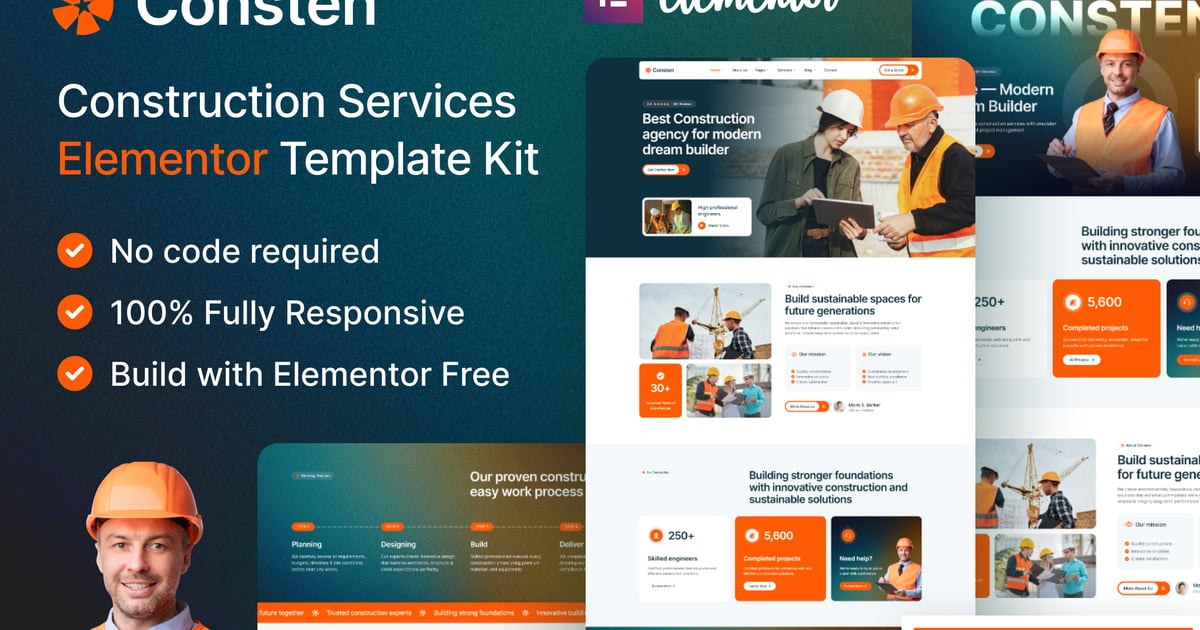
Consten – Construction Services Elementor Template Kit
Consten is a modern and clean Elementor Template Kit designed for Construction Companies, Building Contractors, Architects, and Engineering Firms. It features a professional design with fully responsive layouts, allowing you to build a high-quality website without writing any code.
Built for the Hello Elementor theme and compatible with the free Elementor plugin, Consten is lightweight, fast-loading, and easy to customize. Every page is carefully designed to showcase construction services such as residential and commercial projects, renovation, architectural design, and project management.
Whether you’re creating a new construction company website or redesigning an existing one, Consten includes everything you need to establish a strong online presence.
Template Features
Modern & Professional Design
100% Responsive & Mobile-Friendly
21+ Ready-to-Use Templates
Fully Customizable with Drag & Drop
Compatible with Elementor Free
No Elementor Pro Required
Built for the Hello Elementor Theme
Retina Ready
Cross-Browser Compatible
Global Colors & Typography
Fast Loading & SEO-Friendly Structure
Clean & Well-Organized Layout
No Coding Required
Templates Included
Global Theme Style
Header v1
Footer v1
Home One
About Us
Our Team
Team Details
Projects
Project Details
Services
Service Details
Gallery
Pricing
Blog Grid
Blog List
Blog Details
Contact
404 Page
MetForm Contact
MetForm Contact Two
MetForm Newsletter
Required Plugins
Elementor (Free)
ElementsKit Lite
MetForm
Jeg Kit for Elementor
Gum Addon for Elementor
Smart Custom 404 Error Page
Ultimate Addons for Elementor (UAE)
Skyboot Custom Icons for Elementor
Marquee Addons for Elementor
How to Use
Install and activate the required plugins.
Import the Template Kit using the Envato Elements plugin or Elementor Template Kit importer.
Import the Global Style.
Import the Header and Footer templates.
Import the remaining page templates.
Import the MetForm templates if you want to use the contact forms.
Assign the Header and Footer using the Ultimate Addons for Elementor Header & Footer Builder.
Replace the demo content with your own text and images.
Publish your website.
MetForm Setup
Import the MetForm templates.
Open the page containing the form in Elementor.
Select the MetForm widget and create or edit the form.
Insert the imported MetForm template.
Customize the form if needed.
Save and update the page.
Header & Footer Setup
Open the Ultimate Addons for Elementor Header & Footer Builder.
Create a new Header template.
Set the display condition to Entire Website.
Insert the imported Header template.
Repeat the same process for the Footer template.
Images
Demo images are included for preview purposes only. Replace them with your own licensed images before publishing your website.
Explore more high-quality resources in our Graphics & Illustrations library, and pair them with curated Graphic Templates and Web & Site Templates for your digital creations.
📋 Asset Specifications & Compatibility
Item Title
Consten — Elementor-Vorlagenset Template Kit Baudienstleistungen
Formats / Software
Adobe Photoshop / Illustrator / PNG
License Type
Commercial & Personal Use
Original creative preview & visual showcase
⚡ High-Speed Direct Cloud Download
Original untouched resource package hosted on 5TB unlimited Google Drive:
🔒 Direct SSL Encrypted Link • Fast Unthrottled Speed • Original Clean Archive
🔗 Explore Related Digital Asset Categories