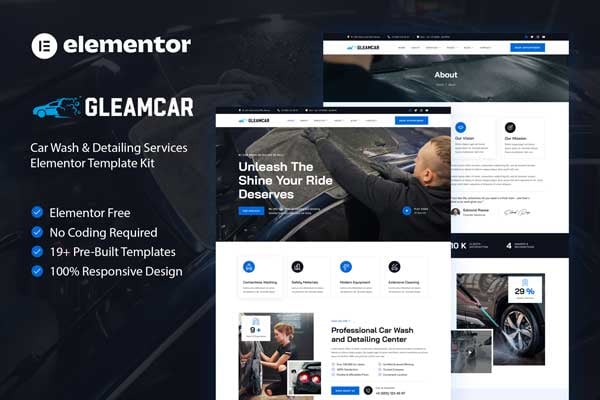
Gleamcar is a sleek and modern Elementor Template Kit designed specifically for car wash and detailing services. Perfect for showcasing your professional automotive care business, Gleamcar offers a clean and dynamic design with a 100% responsive layout, ensuring a seamless browsing experience on any device.
This template kit includes over 15 meticulously crafted templates, allowing you to create a stunning and functional website with ease. With Elementor Page Builder, customization is a breeze—no coding skills required. Elevate your car wash and detailing business with Gleamcar and attract more customers effortlessly.
Important: This is an Elementor Template Kit. Do not use WordPress “Tools > Import”. Install the Template Kit Import plugin (Plugins > Add New), then go to Tools > Template Kit to import.
Perfect for Car Wash & Detailing
Fully With Elementor Free Version (Elementor Pro is not required)
Simple, Modern and Clean Design
No Coding Knowledge Required
19+ Ready To Use Templates
Easy & Fully Customizable
Templates Include:
Global Kit Styles
Services
Services Detail
Pricing
Testimonials
Gallery
404 Page
Coming Soon
Single Blog
Contact
Metform Booking
Metform Contact
Required Plugin:
Elementor (Free)
Jeg Elementor Kit
MetForm
How to Use Template Kits:
This is not a WordPress Theme. Template kits contain the design data for Elementor only and are installed using the Template Kit Import plugin for WordPress.
Install and import kits via Tools > Template Kit after installing the "Template Kit Import" plugin (Plugins > Add New > search "Template Kit Import" by Envato).
Plugins > Add New → search “Template Kit Import” (by Envato) → Install & Activate
Go to Tools > Template Kit
Upload your Template Kit ZIP
Click “Install Requirements”
Import “Global Kit Styles” first, then the pages/parts you need
Help & Support
Need more help? Choose an option below:
Full Guide: https://help.market.envato.com/hc/en-us/articles/36033428836889-How-to-Upload-Install-Elementor-Template-Kits-from-Envato
Contact Us: https://themeforest.net/user/codeinsolutions#message
For further support, go to Elementor > Get Help in WordPress menu.
How To Import Metform Costum Form
Import metform template
Import the template where the form appears, then edit in Elementor
Click the Metform widget in the column where the form should be and click Edit Form
Select New, leave blank selected then click Edit Form button
Click ‘Add Template’ grey folder button
Click ‘My Templates’ tab
Choose your imported metform template, then click ‘Insert’
Once the template is loaded, click ‘Update’
This Template Kit uses demo images from Envato Elements. You will need to license these images from Envato Elements to use them on your website, or you can substitute them with your own.
https://elements.envato.com/collections/CRKE5UMT2Q
FAQ
Can I import via WordPress “Tools > Import”? No. That importer handles WXR posts/pages. This is an Elementor Template Kit and must be imported with the Template Kit Import plugin via Tools > Template Kit.
Do I need Elementor Pro? No, this kit is built for Elementor Free unless otherwise noted.
My pages don’t look like the demo. Go to Tools > Template Kit and click “Install Requirements”, then import “Global Kit Styles” first before importing pages/parts.
Explore more high-quality resources in our Graphics & Illustrations library, and pair them with curated Graphic Templates and Web & Site Templates for your digital creations.
📋 Asset Specifications & Compatibility
Item Title
Gleamcar – Car Wash & Detailing Service Elementor Template Kit
Formats / Software
Adobe Photoshop / Illustrator / PNG
License Type
Commercial & Personal Use
Original creative preview & visual showcase
⚡ High-Speed Direct Cloud Download
Original untouched resource package hosted on 5TB unlimited Google Drive:
🔒 Direct SSL Encrypted Link • Fast Unthrottled Speed • Original Clean Archive
🔗 Explore Related Digital Asset Categories