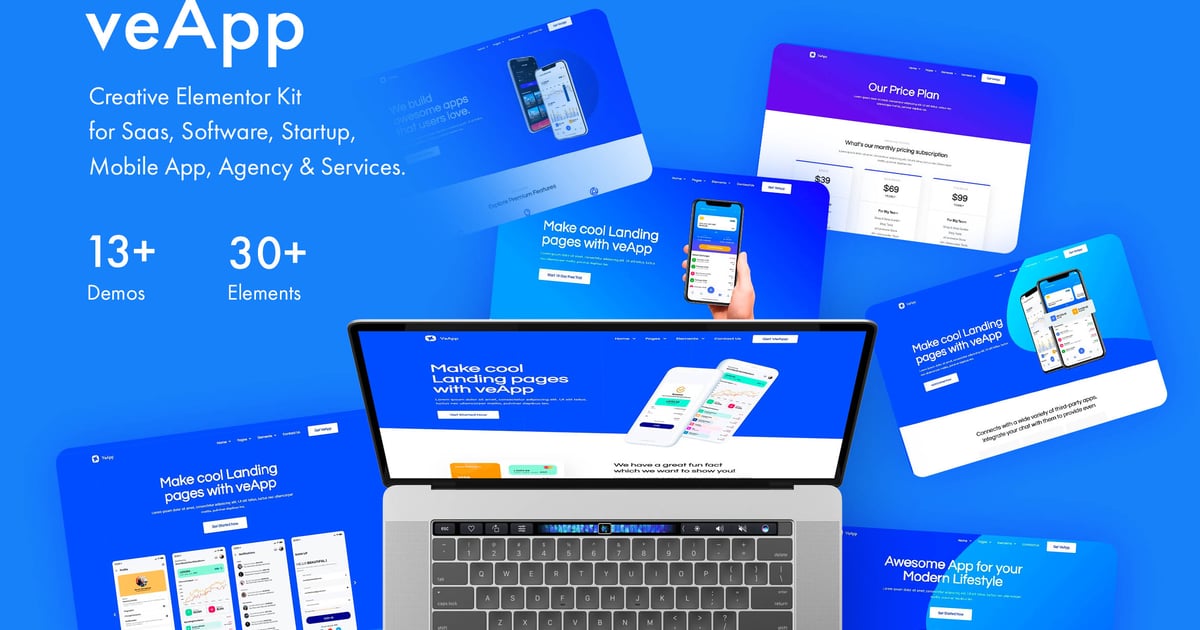
veApp is a creative & unique Elementor templates based on latest technology. All files are clearly organized we believe it will be easy to use and edit them. This theme is well organized and very easy to customize. Its easy to use and navigate as well. Compatible with Desktop, Laptop, table, mobile or any device. Suitable for anyone who is looking for app, app landing, app landing page, app landing template, App Showcase, app store, app template, app website, clean app landing, creative app landing page, landing page, mobile app landing page & modern app Landing.
11 Elementor Templates
True no-code customization with drag and drop visual builder
Customize fonts and colors in one place or fine-tune on individual elements
Modern, professional design
Fast-loading
Works with most Elementor themes.
Kit Includes:
Home 1 Template
Home 2 Template
Home 3 Template
Home 4 Template
About Us
Contact Us Page
Pricing
Reviews
404 Error
Fonts:
Raleway
How to Use Template Kits:
Install and Activate the "Envato Elements" plugin from Plugins > Add New in WordPress
Download your kit file and Do not unzip
Go to Elements > Installed Kits and click the Upload Template Kit button. You may also import automatically by clicking Connect Account to link your Elements subscription, then import under Elements > Template Kits.
Check for the orange banner at the top and click Install Requirements to load any plugins the kit uses
Click import on the Global Kit Styles first
Click Import on one template at a time. These are stored in Elementor under Templates > Saved Templates.
Go to Pages and create a new page and click Edit with Elementor
Click the gear icon at lower-left of the builder to view page settings and choose Elementor Full Width and hide page title
Click the gray folder icon to access My Templates tab and then Import the page you’d like to customize.
Detailed Guide: https://help.market.envato.com/hc/en-us/articles/900000842846-How-to-use-the-Envato-Elements-WordPress-Plugin-v2-0
For further support, go to Elementor > Get Help in WordPress menu.
This Template Kit uses demo images from Envato Elements. You will need to license these images from Envato Elements to use them on your website, or you can substitute them with your own.
https://elements.envato.com/image-P7JPL65
https://elements.envato.com/image-SF8R2EA
https://elements.envato.com/image-BQL3TV8
https://elements.envato.com/image-P4DTYKC
https://elements.envato.com/gorgeous-young-business-woman-looking-camera-XPQU4EY
https://elements.envato.com/portrait-of-a-young-man-in-a-studio-dressed-in-gra-X2FNTMP
https://elements.envato.com/black-businessman-mockup-AWL2DMQ
https://elements.envato.com/image-9DV7XHT
https://elements.envato.com/image-7MD6A95
https://elements.envato.com/image-UJ5JRJ7
https://elements.envato.com/image-PDZTLMB
Explore more high-quality resources in our Graphics & Illustrations library, and pair them with curated Graphic Templates and Web & Site Templates for your digital creations.
📋 Asset Specifications & Compatibility
Item Title
veApp – Mobile App & Startup Elementor Template Kit
Formats / Software
Adobe Photoshop / Illustrator / PNG
License Type
Commercial & Personal Use
Original creative preview & visual showcase
⚡ High-Speed Direct Cloud Download
Original untouched resource package hosted on 5TB unlimited Google Drive:
🔒 Direct SSL Encrypted Link • Fast Unthrottled Speed • Original Clean Archive
🔗 Explore Related Digital Asset Categories