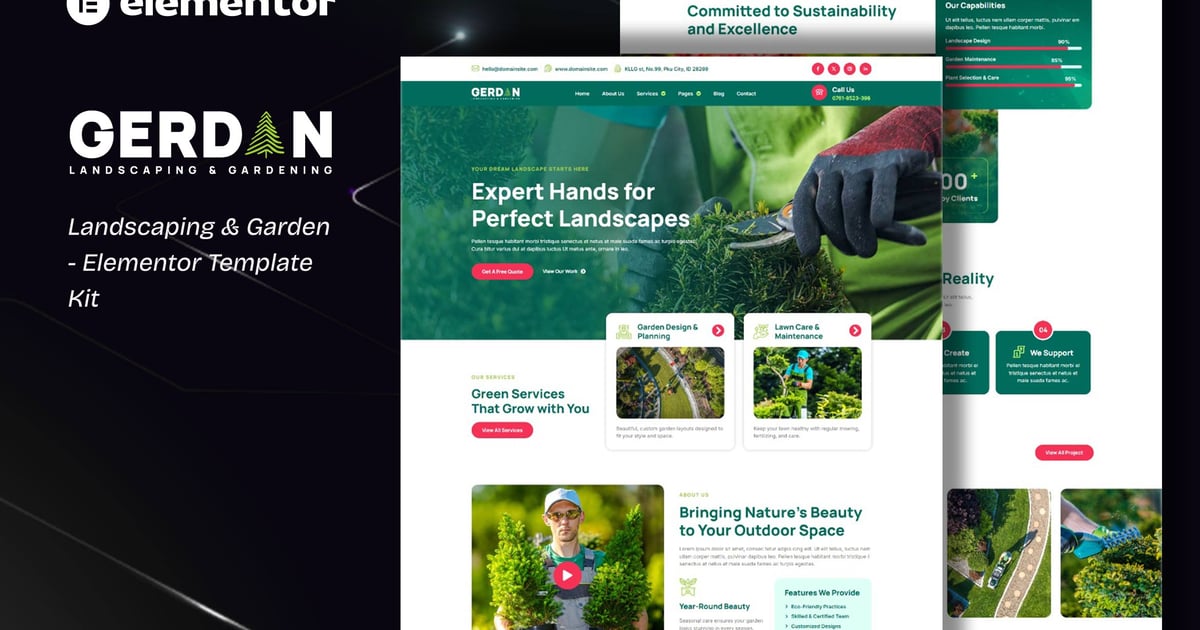
Meet, Gerdan specially designed for Landscaping & Gardening!
This kit has a modern and creative design with a 100% fully responsive layout, easy installation, and sure very easy to customize because using Elementor so you don’t need a single line of coding!Save your time.
This Template Kit contains page content for creating Elementor pages. This kit has been optimized for use with the free "Hello Elementor" theme.
Compatible with WordPress – Elementor
Using Free Plugins (Elementor Pro is not required)
True no-code customization with drag and drop
100% Fully Responsive & mobile-friendly
Modern and Professional design
13+ pre-built templates ready to use
Customize fonts and colors in one place (Global Theme Kit Style)
Templates in Zip :
About Us
Services
Service Detail
Projects
Pricing
404 Page
Contact
Free Quote Form – Block
Plugins installed with kit:
Elementor
RTMForm
How to Use Template Kits:
This is not a WordPress Theme. Template kits contain the design data for Elementor only and are installed using the envato Template Kit Import plugin for WordPress or directly through Elementor.
Detailed Guide:
https://help.market.envato.com/hc/en-us/articles/36033428836889-How-to-Upload-Install-Elementor-Template-Kits-from-Themeforest-to-WordPress
For further support, go to Elementor > Get Help in WordPress menu.
Setup Global Header and Footer in RTMKit
Import the Header & Footer blocks.
Go to RTMKit > Theme Builder > Header in the WordPress admin, then click Add New.
Enter a title, select "Header" as the type, then go to the Conditions tab, set it to "Entire Site", and click Save.
Click Edit with Elementor to open the builder.
In the editor, click the gray folder icon, go to the My Templates tab, select your Header Template, and click Insert.
Make any adjustments, then click Update to save.
Repeat the same steps for the Footer under RTMKit > Theme Builder > Footer.
How to Setup Forms with RTMForm
Import the form blocks.
Go to RTMKit Plugin > Theme Builder > Forms in the WordPress admin.
Click "Add New", enter a form name, then click "Save and Edit".
In the builder, click the gray folder icon, go to the My Templates tab, and click Insert on your form block.
Click Publish (or Update).
When customizing pages with forms, use the RForm widget and select the form you created.
Images:
This Template Kit uses demo images from Envato Elements. You will need to license these images from Envato Elements to use them on your website, or you can substitute them with your own. Blog Content is not included – you will need to add a few posts to WordPress before post content will appear in templates.
https://elements.envato.com/collections/9VBRCEL6SP
Explore more high-quality resources in our Graphics & Illustrations library, and pair them with curated Graphic Templates and Web & Site Templates for your digital creations.
📋 Asset Specifications & Compatibility
Item Title
Gerdan – Kit de plantillas Elementor para paisajismo y jardinería
Formats / Software
Adobe Photoshop / Illustrator / PNG
License Type
Commercial & Personal Use
Original creative preview & visual showcase
⚡ High-Speed Direct Cloud Download
Original untouched resource package hosted on 5TB unlimited Google Drive:
🔒 Direct SSL Encrypted Link • Fast Unthrottled Speed • Original Clean Archive
🔗 Explore Related Digital Asset Categories