TeachFlex is a clean, flexible, and accessibility-minded template kit for online learning platforms, bootcamps, training centers, and educators. Built to help you design online education, bootcamps and learning experiences that look professional and include every learner, TeachFlex combines modern layouts, thoughtful UX, and ready-to-use sections that speed up your launch.
Why Choose TeachFlex
TeachFlex is purpose-built for educators and training teams who need a fast, reliable way to publish inclusive bootcamp sites. Rather than shipping a generic design, this kit provides bootcamp-first templates, pricing and testimonial layouts, and accessibility-minded patterns so your site communicates trust and supports every learner. You get modular sections that are easy to customize with Elementor, consistent visual language for brand clarity, and practical UX that guides visitors from discovery to enrollment.
Key Features
Perfect For
Templates Included
This kit includes a full set of page templates and blocks used across the demo. The list below reflects the pages provided:
Fonts:
This template kit uses free Google Fonts: Georama and Be Vietnam Pro. Both fonts are web-safe and easy to customize via Elementor’s typography settings.
Required Plugins:
To import and use the kit as shown in the demo, the following plugins are required (these are the minimum suggested plugins):
How to Use Template Kits:
This is not a WordPress theme. Template kits contain the design data for Elementor only and are installed using the Envato Template Kit Import plugin for WordPress or directly through Elementor.
Detailed Guide: https://help.market.envato.com/hc/en-us/articles/36033428836889-How-to-Upload-Install-Elementor-Template-Kits-from-Themeforest-to-WordPress
For further support, go to Elementor > Get Help in the WordPress admin menu after importing the kit.
How to Import Header, Footer and Block
The imported templates are automatically categorized by Elementor in the Page or Section type. But not all categorization is appropriate, you need to adjust it to fit when used. One type of Section that needs to be adjusted is a template built using ElementsKit. The simple way to import Header and Footer templates is directly through the ElementsKit menu. If you have Elementor Pro, setup headers and footers in Theme Builder
How to import Metform custom form:
What should I do if the icons don’t appear?
This template kit uses the Skyboot Custom Icons for Elementor — Elementor Icons Library plugin. If icons are missing after import, please follow these steps:
Images
This Template Kit uses demo images from Envato Elements. You will need to license these images from Envato Elements to use them on your website, or you can substitute them with your own.
https://elements.envato.com/collections/NFVD4A3GYJ
Explore more high-quality resources in our Graphics & Illustrations library, and pair them with curated Graphic Templates and Web & Site Templates for your digital creations.
📋 Asset Specifications & Compatibility
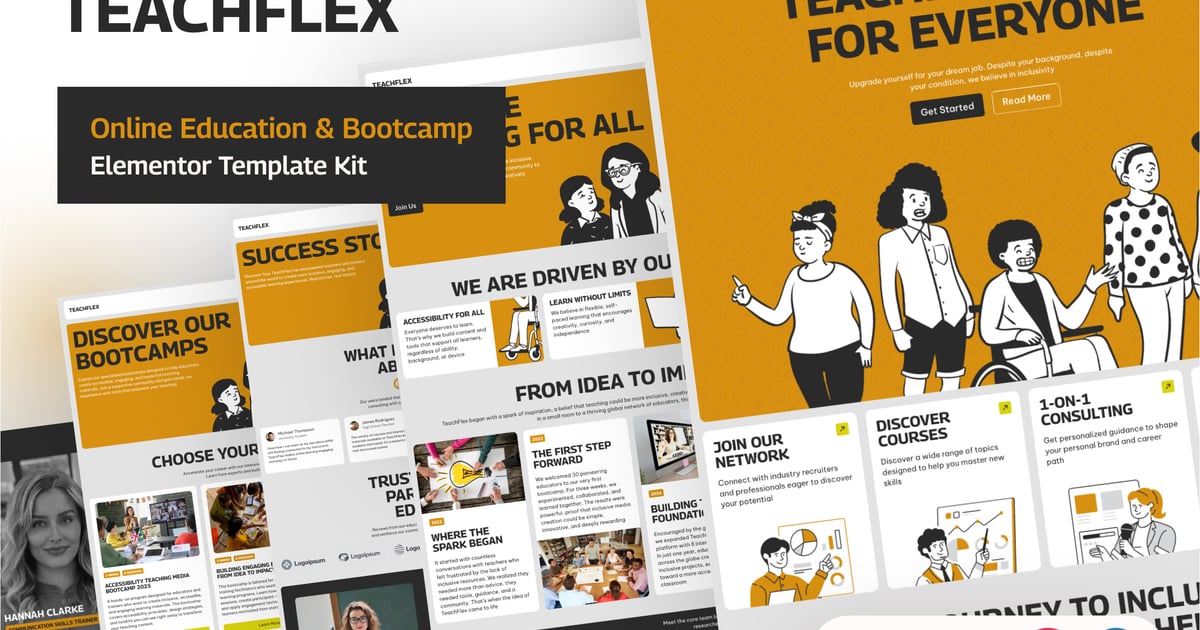
Original creative preview & visual showcase
⚡ High-Speed Direct Cloud Download
Original untouched resource package hosted on 5TB unlimited Google Drive: